 A flexible, affordable audio delivery system!
XStudio is an easy-to-use, powerful audio delivery system for radio, featuring multi-channel, multi-stream playback, multiple user-selected operating modes, audio switcher control and user-defined actions for automatic task execution. Tasks can be initiated from the broadcast log, in response to an audio switcher relay or from the XStudio scheduled events table, providing maximum flexibility in automation control.
XStudio can be used in a number of ways:
- A standalone audio playback system supporting live, local automation and satellite modes of operation.
- A portable playback system – for instance, on a laptop computer.
- A supplemental playback system for secondary program services in HD radio.
- An emergency playback system in the event of a DCS or Maestro system failure.
If you're using an older DCS or Maestro system, XStudio is a great migration path!
Running on a standard PC or laptop PC equipped with a standard Windows-compliant audio card, XStudio can follow the broadcast log, playing audio in sequence, including audio overlap. A single audio output device can be used, with as many as three (3) streams of audio, mixed 1-to-1, playing simultaneously. This ensures smooth audio overlap. Install a multi-channel audio card or additional single-channel cards and use up to four discrete audio outputs, each supporting three (3) streams of audio.
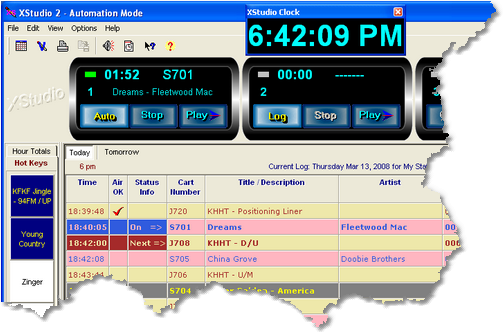
XStudio works well with popular music scheduling and radio traffic systems. Reconciling music and commercial content is easy, as XStudio automatically documents airplay of both scheduled and unscheduled elements.
XStudio utilizes the same logs (schedules) and audio files (.DAF files) as DCS™ and Maestro™ systems. You may use the logs already created for use with DCS or Maestro, or you can create your own logs with the built-in log editor.
Logs can be edited and saved, if desired, on-the-fly within XStudio. Our popular log editing and performance-reporting tools, ezSuite, ezEdit and ezAudit, can also be used with XStudio.
Audio files can be located on the local hard drive in a single folder or can be played directly from a network location. If XStudio is integrated with an existing DCS or Maestro system, the source audio files would typically be played directly from the audio folder of an ACP server.
XStudio is supplied with XEngine, an audio playback server application that allows XStudio to be operated independently from DCS and Maestro, so long as you have audio files produced by these systems available.
XStudio offers a number of powerful features and delivers a reliable, simple-to-use audio delivery system experience.
- Execute a program log in sequence, including audio overlap, using any of 4 modes of operation, including Live, Local Automation, Satellite and Emergency. XStudio's behavior, including how it reacts to log directives, audio switcher input relays, etc, changes with each mode, allowing you to choose the mode of operation that best suits your programming needs. Modes can be manually changed on-the-fly - or automatically with a log directive, user-defined action or as a log-independent scheduled event.
- Up to 4 channel outputs with up to three (3) audio files (streams) playing concurrently, mixed 1-to-1, on each output channel. Play up to 12 streams of audio simultaneously!
- Audio overlap, using the .DAF file AUX mark, for up to 3 elements per output (triple-overlap).
- PCM (linear) and MPEG 2 files supported standard, apt-X™ files supported with optional decoder.
- Sample rates of 16, 32, 44.1 and 48 kHz are supported.
- Hot buttons - just click and play! Hot buttons can also be used to initiate user-defined actions, including setting operating mode, updating an audio switcher, etc.
- Audio switcher control and input relay detection for most Broadcast Tools switchers, including the SS8.2, ACS8.2, and SS16.4 models.
- On-screen switcher status display with on-demand channel on/off control.
- External device control via RS-232 interface. Send user-defined control data to an external device.
- Automated Tasks, including switcher updates, start/stop audio playback, set the clock, set operating mode, relay outputs, precision timers and more. Tasks are grouped together as action lists and can be nested for maximum flexibility. Each task is validated for mode of operation, day and time of day for conditional execution, including time ranges and hour parts.
- Use DCS or Maestro logs that you may already have prepared for use on-air, or create your own. XStudio supports virtually all DCS and Maestro log directives and adds some of its own, including Hard Sync.
- User-configurable log display, including song title and artist information. You control what log elements are displayed, their size, location, element color and font size!
- Use existing DCS or Maestro audio files (*.DAF) or create your own, using dcsTools' XChange software. XStudio supports multi-cut carts, observing cut rotation and date sensitivity, if enabled.
- User options for Auto-Segue, Play through Directives and Wrap the Log that can be changed on-the-fly.
- User-selectable option to enforce cart dates.
- A DCS/Maestro compatible audit data file is generated, documenting system performance. Standard DCS and Maestro tools for reviewing audit data can be used, including our own ezAudit and ezSuite.
- Remote start functionality via a PC game port.
- Drag and drop operation for moving audio items around on the log, including scrolling the log view while dragging.
- Drag and drop audio items (carts) from the station inventory to the log.
- Copy & Paste audio items to and from the log.
- Search the Log by cart number or description.
- Hourly log content totals, calculated from the inventory (if used), along with directive segment time totals. Directive segment totals, too.
- Log Validation. Validation reports can be printed or saved to file.
- Print logs, including print preview and selective printing of pages.
- Inventory printing, including print preview and user-defined filtered inventory lists.
- Integrated context-sensitive help in all editing dialogs.
Application Requirements:
- Operating System: Windows7 Pro or later
- CPU Speed: 1 GHz or greater
- RAM Memory: 4 GB
- VGA Display: a minimum of 800 x 600 resolution, 1024 x 768 or greater is highly recommended, as this resolution is required to display all four playback decks properly. A second monitor is desirable if making extensive use of Cart Wall.
- Audio Card: an audio card supported by the operating system – one playback channel as a minimum. Two (2) or three (3) playback channels are recommended with a maximum of 4 output channels supported.

If only a single audio device is present in the system, that device will also be the one used by Windows to play system sounds. It is highly recommended that all system sounds be disabled if the PC has just one audio device. This will prevent unwanted sounds when playing back audio..
- Game Port: For use as the interface for remote starts (optional).
- A 100 mbs or better LAN card (NIC): The OS’ TCP/IP client must be installed on the PC. XStudio uses TCP/IP to communicate with the host audio server, whether it is the supplied XEngine or a host DCS or Maestro connecting via rcServer.
- Default Print Device: You must have a default print device assigned. XStudio can produce printed reports and lists and expects to have an available default printer. If you do not have a printer, you can use one of the available non-printing devices like the Microsoft XPS Document Writer.
- Disk Space: At least 40 MB free disk space for XStudio, audio engine and documentation files. XStudio Database and Inventory Manager Database files may consume 100MB or more, depending on the size of the audio inventory, music library size and number of Tasks, Actions and Scheduled Events. Additionally, you must have sufficient available disk space to accommodate carts (audio files) that are stored locally.
To use XStudio, you need access to .DAF files, either those used with a DCS or Maestro system or created to meet the .DAF file specification, and optionally, the log files. This means you need be connected to the network (LAN) in which the DCS and/or Maestro units are running, if integrating XStudio with an existing delivery system, or be able to obtain needed files in some other way. Be sure that your system administrator has provided you the necessary access rights to these file locations. For logs, you will need both read and write access to save log files. For audio files, you need only have read rights unless you wish to edit cart header information - in which case you will need both read and write privileges..
Purchasing XStudio
| $1,895.00 US | Order on-line immediately with a credit card using the Buy Now! button. If preferred, we can also send you an invoice for payment by check. |
 |
The base XStudio product includes support for playing back PCM (linear) and MPEG2 audio files. To play apt-X™ encoded files, order XStudio with the apt-X option. |
Delivery
The software is available as a download and can be installed to try it out, with some limitations. After purchase, a registration is sent via email to enable full functionality.
License
This software is subject to a license and warranty agreement. Read the full text of the agreement here.
Guarantee
If you are unsure about the usability of this software, download it and try it out. We offer a free trial registration - it allows you to use the software for a period of time, fully functional, without purchasing. Request a trial registration.
Update Policy
All updates for the same major version of this software are downloadable at no charge. Major version updates may have an associated upgrade charge.
![[Download]](../Graphics/Btn_Download.gif)